
elasticsearch笔记
官网
下载
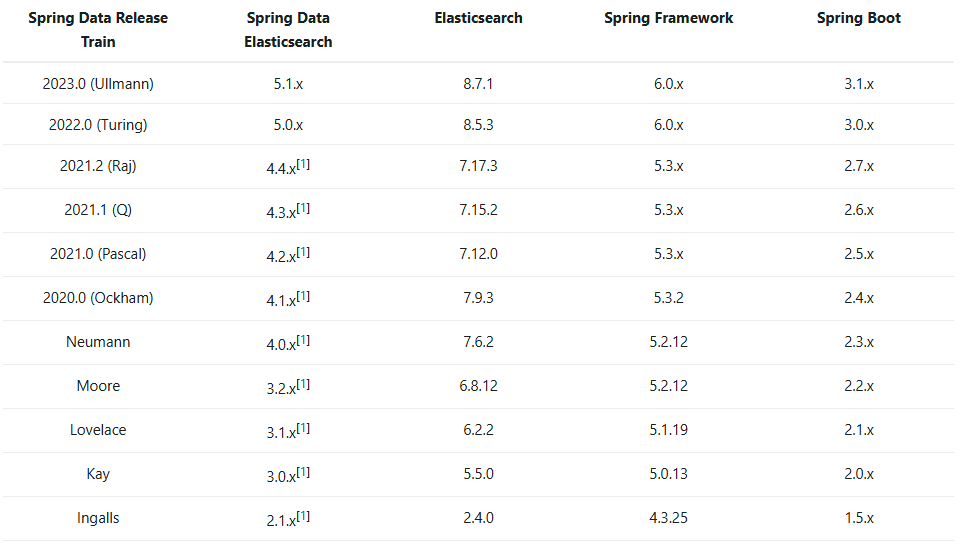
版本对应关系
docker部署elasticsearch
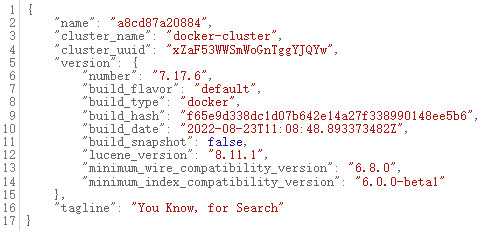
查看是否部署成功
访问localhost:9200,如果出现如下信息,即部署成功
安装中文分词器
docker部署kibana
使用案例
后端
maven依赖
xml
<dependency>
    <groupId>org.springframework.boot</groupId>
    <artifactId>spring-boot-starter-data-elasticsearch</artifactId>
</dependency>配置文件
yaml
spring:
  elasticsearch:
uris: http://localhost:9200实体
java
import lombok.AllArgsConstructor;
import lombok.Data;
import lombok.NoArgsConstructor;
import org.springframework.data.annotation.Id;
import org.springframework.data.elasticsearch.annotations.Document;
import org.springframework.data.elasticsearch.annotations.Field;
import org.springframework.data.elasticsearch.annotations.FieldType;

import java.util.Date;

@Data
@NoArgsConstructor
@AllArgsConstructor
@Document(indexName = "file")
public class File {

    @Id
    private String id;

    /**
     * 文件名称
     */
    @Field(type = FieldType.Text, analyzer = "ik_max_word")
    private String fileName;

    /**
     * 文件分类
     */
    @Field(type = FieldType.Keyword)
    private String fileCategory;

    /**
     * 文件内容
     */
    @Field(type = FieldType.Text, analyzer = "ik_max_word")
    private String fileContent;

    /**
     * 文件存储路径
     */
    @Field(type = FieldType.Keyword, index = false)
    private String filePath;

    /**
     * 文件大小
     */
    @Field(type = FieldType.Keyword, index = false)
    private Long fileSize;

    /**
     * 文件类型
     */
    @Field(type = FieldType.Keyword, index = false)
    private String fileType;

    /**
     * 创建人
     */
    @Field(type = FieldType.Keyword, index = false)
    private String createBy;

    /**
     * 创建日期
     */
    @Field(type = FieldType.Keyword, index = false)
    private Date createTime;

    /**
     * 更新人
     */
    @Field(type = FieldType.Keyword, index = false)
    private String updateBy;

    /**
     * 更新日期
     */
    @Field(type = FieldType.Keyword, index = false)
    private Date updateTime;

}repository接口
继承ElasticsearchRepository
java
import org.springframework.data.domain.Page;
import org.springframework.data.domain.Pageable;
import org.springframework.data.elasticsearch.annotations.Highlight;
import org.springframework.data.elasticsearch.annotations.HighlightField;
import org.springframework.data.elasticsearch.annotations.HighlightParameters;
import org.springframework.data.elasticsearch.core.SearchHit;
import org.springframework.data.elasticsearch.repository.ElasticsearchRepository;
import org.springframework.stereotype.Repository;

import java.util.List;

@Repository
public interface FileRepository extends ElasticsearchRepository<File, String> {

    /**
     * 关键字查询
     *
     * @return
     */
    @Highlight(fields = {@HighlightField(name = "fileName"), @HighlightField(name = "fileContent")},
            parameters = @HighlightParameters(preTags = {"<span style='color:red'>"}, postTags = {"</span>"}, numberOfFragments = 0))
    List<SearchHit<File>> findByFileNameOrFileContent(String fileName, String fileContent, Pageable pageable);
}service接口
java
import org.springframework.data.elasticsearch.core.SearchHit;
import org.springframework.data.elasticsearch.core.SearchHits;

import java.util.List;

public interface IFileService {

    /**
     * 保存文件
     */
    void saveFile(String filePath, String fileCategory) throws Exception;

    /**
     * 关键字查询
     *
     * @return
     */
    List<SearchHit<File>> search(FileDTO dto);

    /**
     * 关键字查询
     *
     * @return
     */
    SearchHits<File> searchPage(FileDTO dto);
}service实现类
java
import cn.hutool.core.util.IdUtil;
import lombok.extern.slf4j.Slf4j;
import org.apache.commons.lang3.StringUtils;
import org.apache.shiro.SecurityUtils;
import org.elasticsearch.index.query.QueryBuilders;
import org.elasticsearch.search.fetch.subphase.highlight.HighlightBuilder;
import org.elasticsearch.search.sort.SortBuilders;
import org.elasticsearch.search.sort.SortOrder;
import org.jeecg.common.exception.JeecgBootException;
import org.jeecg.common.system.vo.LoginUser;
import org.jeecg.common.util.CommonUtils;
import org.jeecg.common.util.MinioUtil;
import org.springframework.beans.factory.annotation.Autowired;
import org.springframework.data.domain.PageRequest;
import org.springframework.data.domain.Pageable;
import org.springframework.data.domain.Sort;
import org.springframework.data.elasticsearch.core.ElasticsearchRestTemplate;
import org.springframework.data.elasticsearch.core.SearchHit;
import org.springframework.data.elasticsearch.core.SearchHits;
import org.springframework.data.elasticsearch.core.query.NativeSearchQuery;
import org.springframework.data.elasticsearch.core.query.NativeSearchQueryBuilder;
import org.springframework.stereotype.Service;

import java.io.InputStream;
import java.util.Date;
import java.util.List;
import java.util.Objects;

@Slf4j
@Service
public class FileServiceImpl implements IFileService {

    @Autowired
    private FileRepository fileRepository;

    @Autowired
    private ElasticsearchRestTemplate elasticsearchRestTemplate;

    /**
     * 保存文件
     */
    @Override
    public void saveFile(String filePath, String fileCategory) throws Exception {
        if (Objects.isNull(filePath)) {
            throw new JeecgBootException("文件不存在");
        }

        LoginUser user = (LoginUser) SecurityUtils.getSubject().getPrincipal();

        String fileName = CommonUtils.getFileNameByUrl(filePath);
        String fileType = StringUtils.isNotBlank(fileName) ? fileName.substring(fileName.lastIndexOf(".") + 1) : null;

        InputStream inputStream = MinioUtil.getMinioFile(filePath);

        // 读取文件内容,上传到es,方便后续的检索
        String fileContent = FileUtils.readFileContent(inputStream, fileType);
        File file = new File();
        file.setId(IdUtil.getSnowflake(1, 1).nextIdStr());
        file.setFileContent(fileContent);
        file.setFileName(fileName);
        file.setFilePath(filePath);
        file.setFileType(fileType);
        file.setFileCategory(fileCategory);
        file.setCreateBy(user.getUsername());
        file.setCreateTime(new Date());
        fileRepository.save(file);
    }


    /**
     * 关键字查询
     *
     * @return
     */
    @Override
    public List<SearchHit<File>> search(FileDTO dto) {
        Pageable pageable = PageRequest.of(dto.getPageNo() - 1, dto.getPageSize(), Sort.Direction.DESC, "createTime");
        return fileRepository.findByFileNameOrFileContent(dto.getKeyword(), dto.getKeyword(), pageable);
    }


    @Override
    public SearchHits<File> searchPage(FileDTO dto) {
        NativeSearchQueryBuilder queryBuilder = new NativeSearchQueryBuilder();
        queryBuilder.withQuery(QueryBuilders.multiMatchQuery(dto.getKeyword(), "fileName", "fileContent"));
        // 设置高亮
        HighlightBuilder highlightBuilder = new HighlightBuilder();
        String[] fieldNames = {"fileName", "fileContent"};
        for (String fieldName : fieldNames) {
            highlightBuilder.field(fieldName);
        }
        highlightBuilder.preTags("<span style='color:red'>");
        highlightBuilder.postTags("</span>");
        highlightBuilder.order();
        queryBuilder.withHighlightBuilder(highlightBuilder);

        // 也可以添加分页和排序
        queryBuilder.withSorts(SortBuilders.fieldSort("createTime").order(SortOrder.DESC))
                .withPageable(PageRequest.of(dto.getPageNo() - 1, dto.getPageSize()));

        NativeSearchQuery nativeSearchQuery = queryBuilder.build();

        return elasticsearchRestTemplate.search(nativeSearchQuery, File.class);
    }

}controller
java
import lombok.extern.slf4j.Slf4j;
import org.jeecg.common.api.vo.Result;
import org.springframework.beans.factory.annotation.Autowired;
import org.springframework.web.bind.annotation.PostMapping;
import org.springframework.web.bind.annotation.RequestBody;
import org.springframework.web.bind.annotation.RequestMapping;
import org.springframework.web.bind.annotation.RestController;

@Slf4j
@RestController
@RequestMapping("/elasticsearch/file")
public class FileController {

    @Autowired
    private IFileService fileService;


    /**
     * 保存文件
     *
     * @return
     */
    @PostMapping(value = "/saveFile")
    public Result<?> saveFile(@RequestBody File file) throws Exception {
        fileService.saveFile(file.getFilePath(), file.getFileCategory());
        return Result.OK();
    }


    /**
     * 关键字查询-repository
     *
     * @throws Exception
     */
    @PostMapping(value = "/search")
    public Result<?> search(@RequestBody FileDTO dto) {
        return Result.OK(fileService.search(dto));
    }

    /**
     * 关键字查询-原生方法
     *
     * @throws Exception
     */
    @PostMapping(value = "/searchPage")
    public Result<?> searchPage(@RequestBody FileDTO dto) {
        return Result.OK(fileService.searchPage(dto));
    }

}工具类
java
import lombok.extern.slf4j.Slf4j;
import org.apache.pdfbox.pdmodel.PDDocument;
import org.apache.pdfbox.text.PDFTextStripper;
import org.apache.poi.xwpf.extractor.XWPFWordExtractor;
import org.apache.poi.xwpf.usermodel.XWPFDocument;

import java.io.IOException;
import java.io.InputStream;
import java.io.InputStreamReader;
import java.nio.charset.StandardCharsets;
import java.util.Arrays;
import java.util.List;

@Slf4j
public class FileUtils {

    private static final List<String> FILE_TYPE;

    static {
        FILE_TYPE = Arrays.asList("pdf", "doc", "docx", "text");
    }

    public static String readFileContent(InputStream inputStream, String fileType) throws Exception{
        if (!FILE_TYPE.contains(fileType)) {
            return null;
        }
        // 使用PdfBox读取pdf文件内容
        if ("pdf".equalsIgnoreCase(fileType)) {
            return readPdfContent(inputStream);
        } else if ("doc".equalsIgnoreCase(fileType) || "docx".equalsIgnoreCase(fileType)) {
            return readDocOrDocxContent(inputStream);
        } else if ("text".equalsIgnoreCase(fileType)) {
            return readTextContent(inputStream);
        }

        return null;
    }


    private static String readPdfContent(InputStream inputStream) throws Exception {
        // 加载PDF文档(此处使用的是Apache PDFBox)
        PDDocument pdDocument = PDDocument.load(inputStream);

        // 创建PDFTextStripper对象, 提取文本
        PDFTextStripper textStripper = new PDFTextStripper();

        // 提取文本
        String content = textStripper.getText(pdDocument);
        // 关闭PDF文档
        pdDocument.close();
        return content;
    }


    private static String readDocOrDocxContent(InputStream inputStream) {
        try {
            // 加载DOC文档(此处使用的是Apache poi)
            XWPFDocument document = new XWPFDocument(inputStream);

            // 2. 提取文本内容
            XWPFWordExtractor extractor = new XWPFWordExtractor(document);
            return extractor.getText();
        } catch (IOException e) {
            e.printStackTrace();
            return null;
        }
    }


    private static String readTextContent(InputStream inputStream) {
        StringBuilder content = new StringBuilder();
        try (InputStreamReader isr = new InputStreamReader(inputStream, StandardCharsets.UTF_8)) {
            int ch;
            while ((ch = isr.read()) != -1) {
                content.append((char) ch);
            }
        } catch (IOException e) {
            e.printStackTrace();
            return null;
        }
        return content.toString();
    }

}dto
java
import lombok.Data;

@Data
public class FileDTO {

    private String keyword;

    private Integer pageNo;

    private Integer pageSize;

}前端
查询组件
vue
<template>
    <a-input-search
        v-model:value="pageInfo.keyword"
        placeholder="全文检索"
        @search="handleSearch"
        style="width: 220px;margin-left:30px"
    />
    <a-modal v-model:visible="showSearch" title="全文检索" width="900px" :footer="null"
             destroy-on-close>
      <SearchContent :items="searchItems" :loading="loading"/>
      <div style="padding: 10px;display: flex;justify-content: flex-end">
        <Pagination v-if="pageInfo.total" :pageSize="pageInfo.pageSize" :pageNo="pageInfo.pageNo"
                    :total="pageInfo.total" @pageChange="changePage" :show-total="total => `共 ${total} 条`"/>
      </div>
    </a-modal>
</template>

<script lang="ts" setup>
import {ref} from 'vue'
import {Pagination} from "ant-design-vue";
import SearchContent from "@/components/ElasticSearch/SearchContent.vue"
import {searchPage} from "@/api/sys/elasticsearch"

const loading = ref<boolean>(false)
const showSearch = ref<any>(false)
const searchItems = ref<any>();

const pageInfo = ref<{
  pageNo: number;
  pageSize: number;
  keyword: string;
  total: number;
}>({
  // 当前页码
  pageNo: 1,
  // 当前每页显示多少条数据
  pageSize: 10,
  keyword: '',
  total: 0,
});

async function handleSearch() {
  if (!pageInfo.value.keyword) {
    return;
  }
  pageInfo.value.pageNo = 1
  showSearch.value = true
  await getSearchItems();
}

function changePage(pageNo) {
  pageInfo.value.pageNo = pageNo
  getSearchItems();
}

async function getSearchItems() {
  loading.value = true
  try {
    const res: any = await searchPage(pageInfo.value);
    searchItems.value = res?.searchHits;
    debugger
    pageInfo.value.total = res?.totalHits
  } finally {
    loading.value = false
  }
}
</script>

<style scoped></style>接口
elasticsearch.ts
ts
<template>
    <a-input-search
        v-model:value="pageInfo.keyword"
        placeholder="全文检索"
        @search="handleSearch"
        style="width: 220px;margin-left:30px"
    />
    <a-modal v-model:visible="showSearch" title="全文检索" width="900px" :footer="null"
             destroy-on-close>
      <SearchContent :items="searchItems" :loading="loading"/>
      <div style="padding: 10px;display: flex;justify-content: flex-end">
        <Pagination v-if="pageInfo.total" :pageSize="pageInfo.pageSize" :pageNo="pageInfo.pageNo"
                    :total="pageInfo.total" @pageChange="changePage" :show-total="total => `共 ${total} 条`"/>
      </div>
    </a-modal>
</template>

<script lang="ts" setup>
import {ref} from 'vue'
import {Pagination} from "ant-design-vue";
import SearchContent from "@/components/ElasticSearch/SearchContent.vue"
import {searchPage} from "@/api/sys/elasticsearch"

const loading = ref<boolean>(false)
const showSearch = ref<any>(false)
const searchItems = ref<any>();

const pageInfo = ref<{
  pageNo: number;
  pageSize: number;
  keyword: string;
  total: number;
}>({
  // 当前页码
  pageNo: 1,
  // 当前每页显示多少条数据
  pageSize: 10,
  keyword: '',
  total: 0,
});

async function handleSearch() {
  if (!pageInfo.value.keyword) {
    return;
  }
  pageInfo.value.pageNo = 1
  showSearch.value = true
  await getSearchItems();
}

function changePage(pageNo) {
  pageInfo.value.pageNo = pageNo
  getSearchItems();
}

async function getSearchItems() {
  loading.value = true
  try {
    const res: any = await searchPage(pageInfo.value);
    searchItems.value = res?.searchHits;
    debugger
    pageInfo.value.total = res?.totalHits
  } finally {
    loading.value = false
  }
}
</script>

<style scoped></style>搜索内容组件
SearchContent.vue
vue
<template>
  <a-spin :spinning="loading">
    <div class="searchContent">
      <div v-for="(item,index) in items" :key="index" v-if="!!items.length > 0">
        <a-card class="contentCard">
          <template #title>
            <a @click="detailSearch(item.content)">
              <div class="flex" style="align-items: center">
                <div>
                  <img src="../../assets/images/pdf.png" v-if="item?.content?.fileType=='pdf'" style="width: 20px"/>
                  <img src="../../assets/images/word.png" v-if="item?.content?.fileType=='word'" style="width: 20px"/>
                  <img src="../../assets/images/excel.png" v-if="item?.content?.fileType=='excel'" style="width: 20px"/>
                </div>
                <div style="margin-left:10px">
                  <article class="article" v-html="item.highlightFields.fileName"
                           v-if="item?.highlightFields?.fileName"></article>
                  <span v-else>{{ item?.content?.fileName }}</span>
                </div>
              </div>
            </a>
          </template>
          <div class="item">
            <article class="article" v-html="item.highlightFields.fileContent"
                     v-if="item?.highlightFields?.fileContent"></article>
            <span v-else>{{
                item?.content?.fileContent?.length > 150 ? item.content.fileContent.substring(0, 150) + '......' : item.content.fileContent
              }}</span>
          </div>
        </a-card>
      </div>
      <EmptyData v-else/>
    </div>
  </a-spin>
</template>
<script lang="ts" setup>
import {useGlobSetting} from "@/hooks/setting";
import EmptyData from "/@/components/ElasticSearch/EmptyData.vue";
import {ref} from "vue";

const glob = useGlobSetting();

const props = defineProps({
  loading: {
    type: Boolean,
    default: false
  },
  items: {
    type: Array,
    default: []
  },
})

function detailSearch(searchItem) {
  const url = ref(`${glob.domainUrl}/sys/common/pdf/preview/`);
  window.open(url.value + searchItem.filePath + '#scrollbars=0&toolbar=0&statusbar=0', '_blank');
}

</script>
<style lang="less" scoped>
.searchContent {
  min-height: 500px;
  overflow-y: auto;
}

.contentCard {
  margin: 10px 20px;
}

a {
  color: black;
}

a:hover {
  color: #3370ff;
}

:deep(.ant-card-body) {
  padding: 13px;
}
</style>